
TL;DR
We received a Business Email Compromise (BEC) phishing email disguised as a payment advice notification forwarded by a compromised corporate account. Our analysis revealed a sophisticated three-stage attack chain:
- Stage 1: A fake Google Drive page hosted on
systeme[.]io(a legitimate marketing platform abused as phishing infrastructure) - Stage 2: A fake CAPTCHA gate on
treadrure[.]workswith heavily obfuscated JavaScript that builds and auto-submits a hidden POST form - Stage 3: A pixel-perfect Google Sign-in clone using Socket.IO 4.6.0 for real-time Adversary-in-the-Middle (AiTM) credential relay and CryptoJS 4.2.0 for encrypted exfiltration — handling every Google 2FA method including SMS, TOTP, push, backup codes, and recovery flows
1. The Phishing Email
The attack begins with a forwarded email that landed in a corporate Google Groups mailing list. Here are the sanitized headers:
| |
What Makes This Email Convincing
The email appears to be forwarded by a legitimate employee at a real company (a global business process automation firm). The forwarding account has a proper email signature with:
- Full name and title (“Customer Relationship Manager”)
- Office address (6641 N. Beltline Rd, Suite 100, Dallas TX 75063)
- Phone numbers and corporate branding images
- Links to the real corporate domain
The “FYI….” at the top makes it look like an internal forward of a routine payment notification — a classic BEC social engineering technique.
The Forwarded Message
Inside the forwarded content, the actual phishing payload is minimal:
| |
The link text says “PaymentAdvice02202026-pdf” but actually points to systeme.io — not a PDF at all. A “disclaimer” block at the bottom references ventia.com, an Australian infrastructure company completely unrelated to the sender — a copy-paste artifact from a different phishing template or compromised mailbox.
Email Authentication Analysis
Here is what makes this email particularly dangerous — it passes all standard email authentication checks:
| |
The forwarding employee’s Google Workspace account appears to be genuinely compromised — this is not a spoofed email. The original “payment advice” from payables@jumpgrowth[.]us was forwarded through a real, authenticated corporate mailbox.
Sender Domain: jumpgrowth.us
| |
The domain jumpgrowth[.]us is registered to a legitimate IT staffing/consulting company. It is likely that this domain was also compromised and used to send the initial “AP” (Accounts Payable) payment advice emails.
2. Stage 1: Fake Google Drive (systeme.io)
Clicking the link takes the victim to https://53ab-dm.systeme[.]io/ — a page hosted on systeme.io, a legitimate SaaS marketing/funnel-building platform.

The phishing page impersonates Google Drive with the Google “G” logo, Drive icon surrounded by document-type icons (Word, PDF, Excel, Images), and a prominent “VIEW OR DOWNLOAD DOCUMENT” button. The footer reads “Google Drive ©2026 Google” with fake Privacy Policy and Terms links.
Why systeme.io?
Attackers abuse legitimate marketing platforms because:
- Domain reputation:
systeme.iohas high trust scores — email filters and web proxies rarely block it - Free tier: The platform allows creating landing pages for free, no identity verification required
- SSL by default: Amazon CloudFront provides HTTPS, lending visual credibility
- Easy setup: Drag-and-drop page builders make it trivial to clone Google Drive’s appearance
Page Structure
Every link on the page — the “Secured Google Drive” header, the “VIEW OR DOWNLOAD DOCUMENT” button, “Privacy Policy”, and “Terms of Service” — all point to the same URL:
| |
The subdomain 53ab-dm on systeme.io is a unique identifier for this campaign — likely one of many rotating subdomains the attacker creates and discards.
3. Stage 2: Fake CAPTCHA Gate (treadrure.works)
The second stage presents a convincing “Human Checkpoint” CAPTCHA page:
| |
Obfuscated Form Builder
The page includes a self-executing JavaScript function that constructs a hidden HTML form using string manipulation to evade static analysis:
| |
This creates a hidden <form method="POST"> with a hidden input named zone. The form is injected into the DOM at runtime, invisible to static page scrapers.
Canvas-Rendered CAPTCHA
The CAPTCHA is rendered client-side on an HTML <canvas> element using randomized fonts, rotation, wave distortion, and noise dots. This is not a real bot-detection service — it is purely an anti-analysis gate to prevent automated security scanners from reaching the credential harvesting page.
Auto-Submit on Verification
When the user enters the correct code, the verification handler calls:
| |
The first letter of each word — s, u, b, m, i, t — spells submit. This obfuscated form.submit() call POSTs to the server, which redirects to the final credential harvesting stage.
4. Stage 3: AiTM Google Sign-In Clone
After the CAPTCHA, the victim lands on a pixel-perfect replica of the Google Sign-in page:
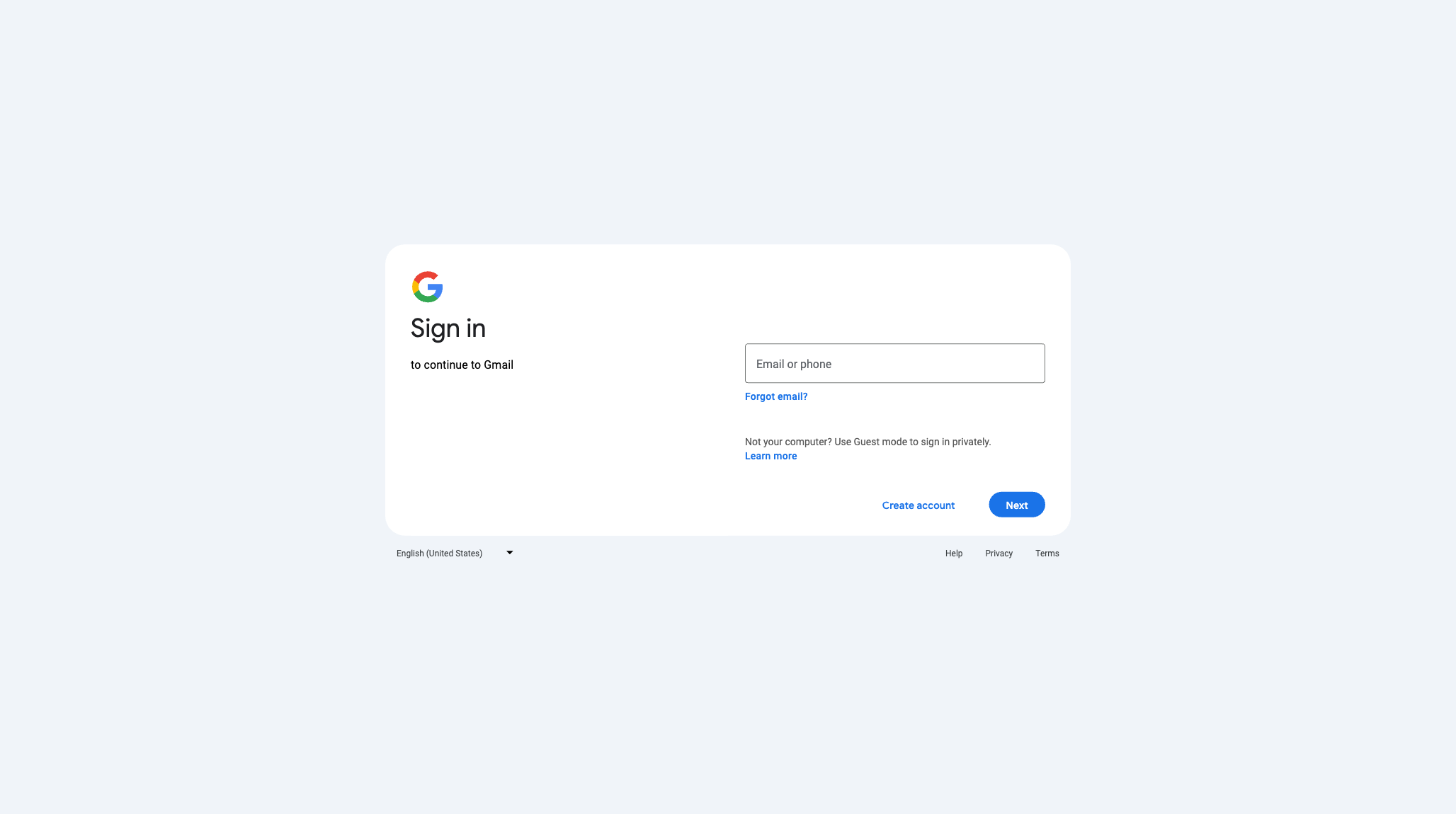
The credential harvesting page shows “Sign in to continue to Gmail” with the standard Google layout — email input, “Forgot email?” link, Guest mode suggestion, “Create account” and “Next” buttons. The URL bar reveals put.treadrure[.]works instead of accounts.google.com.
Comprehensive 2FA Interception
This is not a simple login page clone. The DOM contains pre-built screens for every possible Google authentication flow:
| Screen | Purpose |
|---|---|
| Email entry | “Sign in to continue to Gmail” — captures email address |
| Password entry | “Enter your password” with show/hide toggle |
| SMS verification | “A text message with a 6-digit verification code was just sent to (•••) •••-••12” |
| Phone call verification | “Google is calling with a 6-digit verification code” |
| Google Authenticator | “Get a verification code from the Google Authenticator app” |
| Push notification | “Google sent a notification to your [device]. Tap Yes to verify.” |
| Backup codes | “Enter one of your 8-digit backup codes” |
| Recovery email | “Confirm the recovery email address you added to your account” |
| Security code from device | Step-by-step instructions to get a code from Settings → Google → Security |
| Change password | “There’s been suspicious activity on your Google Account” |
| Sign-in stopped | Rate-limiting / blocked screen |
| CAPTCHA challenge | Additional bot detection within the login flow |
The masked phone numbers ((•••) •••-••29, (•••) •••-••12) show that the kit dynamically fetches the victim’s real partial phone number from Google — confirming this is a real-time proxy, not a static clone.
Real-Time AiTM Architecture
The network traffic reveals the libraries powering the real-time credential relay:
| Library | Version | Role |
|---|---|---|
| Socket.IO | 4.6.0 | Real-time WebSocket communication between victim’s browser and attacker’s server |
| CryptoJS | 4.2.0 | Client-side encryption of stolen credentials before exfiltration |
| jQuery | 3.6.0 | DOM manipulation for showing/hiding authentication screens |
| list.js | 2.3.1 | Country code filtering for phone number input |
The Adversary-in-the-Middle flow works like this:
| |
The attacker proxies each step in real-time via Socket.IO, presenting the correct 2FA challenge to the victim based on what Google actually requires for that account. Once Google issues a session token, the attacker captures it — game over.
Self-Hosted Google Fonts
The phishing kit serves Google’s proprietary fonts locally to avoid external requests that might tip off network monitoring:
| |
Locale Leak
The Terms of Service link points to:
| |
The loc=PK parameter (Pakistan) is a configuration artifact revealing the phishing kit developer’s likely locale or testing origin.
5. Infrastructure Analysis
Domain: treadrure.works
| |
The domain name treadrure is a deliberate typosquat of “treasure” — close enough to pass a quick glance but different enough to be available for registration. The wildcard SSL certificate allows the attacker to spin up unlimited subdomains (put.treadrure.works, get.treadrure.works, etc.) without issuing new certificates.
Domain: gefai.best (Secondary Infrastructure)
| |
The subdomain rainy.gefai[.]best serves a JavaScript resource (autogen.sfbnmak) loaded by the phishing page — likely analytics, fingerprinting, or additional obfuscation code.
Platform Abuse: systeme.io
| |
Systeme.io is a legitimate French SaaS platform for building landing pages, email funnels, and online courses. The attacker abuses the free tier to host convincing phishing landing pages that inherit the platform’s trusted domain reputation.
6. Attack Flow Summary
| |
7. Indicators of Compromise
Network IOCs
| Indicator | Type | Role |
|---|---|---|
53ab-dm.systeme[.]io | Hostname | Stage 1: Fake Google Drive landing page |
treadrure[.]works | Domain | Primary phishing infrastructure |
put.treadrure[.]works | Hostname | Stage 2-3: CAPTCHA + credential harvester |
gefai[.]best | Domain | Secondary infrastructure |
rainy.gefai[.]best | Hostname | JavaScript delivery |
jumpgrowth[.]us | Domain | Spoofed AP sender domain |
104.21.74.207 | IPv4 | treadrure.works (Cloudflare) |
172.67.162.229 | IPv4 | treadrure.works (Cloudflare) |
104.21.2.115 | IPv4 | gefai.best (Cloudflare) |
172.67.129.33 | IPv4 | gefai.best (Cloudflare) |
payables@jumpgrowth[.]us | Spoofed Accounts Payable sender |
URLs
| URL | Stage |
|---|---|
https://53ab-dm.systeme[.]io/ | Stage 1: Fake Google Drive |
https://put.treadrure[.]works/rInJJaP!G6vsvdamVzI/ | Stage 2: Fake CAPTCHA gate |
https://rainy.gefai[.]best/autogen.sfbnmak | Malicious JavaScript resource |
SSL Certificates
| Domain | Issuer | Valid From | Valid To |
|---|---|---|---|
treadrure.works (+ wildcard) | Google Trust Services WE1 | 2026-01-31 | 2026-05-01 |
gefai.best | Google Trust Services WE1 | 2026-02-11 | 2026-05-12 |
Phishing Kit Fingerprints
| |
MITRE ATT&CK
| ID | Technique |
|---|---|
| T1566.002 | Phishing: Spearphishing Link |
| T1586.002 | Compromise Accounts: Email Accounts (BEC) |
| T1608.005 | Stage Capabilities: Link Target (systeme.io abuse) |
| T1557 | Adversary-in-the-Middle (real-time credential relay) |
| T1539 | Steal Web Session Cookie (session token capture) |
| T1111 | Multi-Factor Authentication Interception |
| T1036 | Masquerading (fake Google Drive, fake Google Sign-in) |
AlienVault OTX Pulse
IOCs from this analysis have been published to AlienVault OTX:
BEC Phishing: Fake Payment Advice to AiTM Google Credential Harvester
8. Detection and Recommendations
For Security Teams
- Block
treadrure[.]worksandgefai[.]bestat the DNS/proxy level - Alert on Socket.IO WebSocket connections to non-corporate domains — legitimate Google login never uses Socket.IO
- Flag emails containing links to
systeme.iosubdomains, especially in finance/payment contexts - Monitor for Google Workspace accounts sending unusual forwards to mailing lists
- Report the systeme.io page at
53ab-dm.systeme.ioto systeme.io abuse team
For End Users
- Check the URL bar before entering Google credentials —
accounts.google.comis the only legitimate domain - Be suspicious of “payment advice” emails that link to document-sharing services instead of attaching actual files
- Use hardware security keys (FIDO2/WebAuthn) — they are the only 2FA method that AiTM phishing kits cannot intercept, because the key cryptographically binds to the real domain
- Report suspicious forwarded emails to your IT security team, even if they come from known colleagues
Why Hardware Security Keys Matter
AiTM phishing kits like this one can intercept SMS codes, TOTP codes, push notifications, backup codes, and recovery email verifications. The only 2FA method they cannot defeat is FIDO2/WebAuthn hardware security keys (like YubiKeys or Titan Security Keys), because the cryptographic challenge-response is bound to the real domain (google.com) and will not respond to a phishing domain (treadrure.works).
Analysis performed on 2026-02-24. Email headers sanitized to protect the compromised individual’s identity. IOCs published to AlienVault OTX.